
← Apps & tools
Windows desktop app

TBB Backup

Protect what you build.

I’m building a TBB desktop backup tool for projects and everyday files, with version history, verified backups and a clear file restore browser.

In developmentPricing to confirm
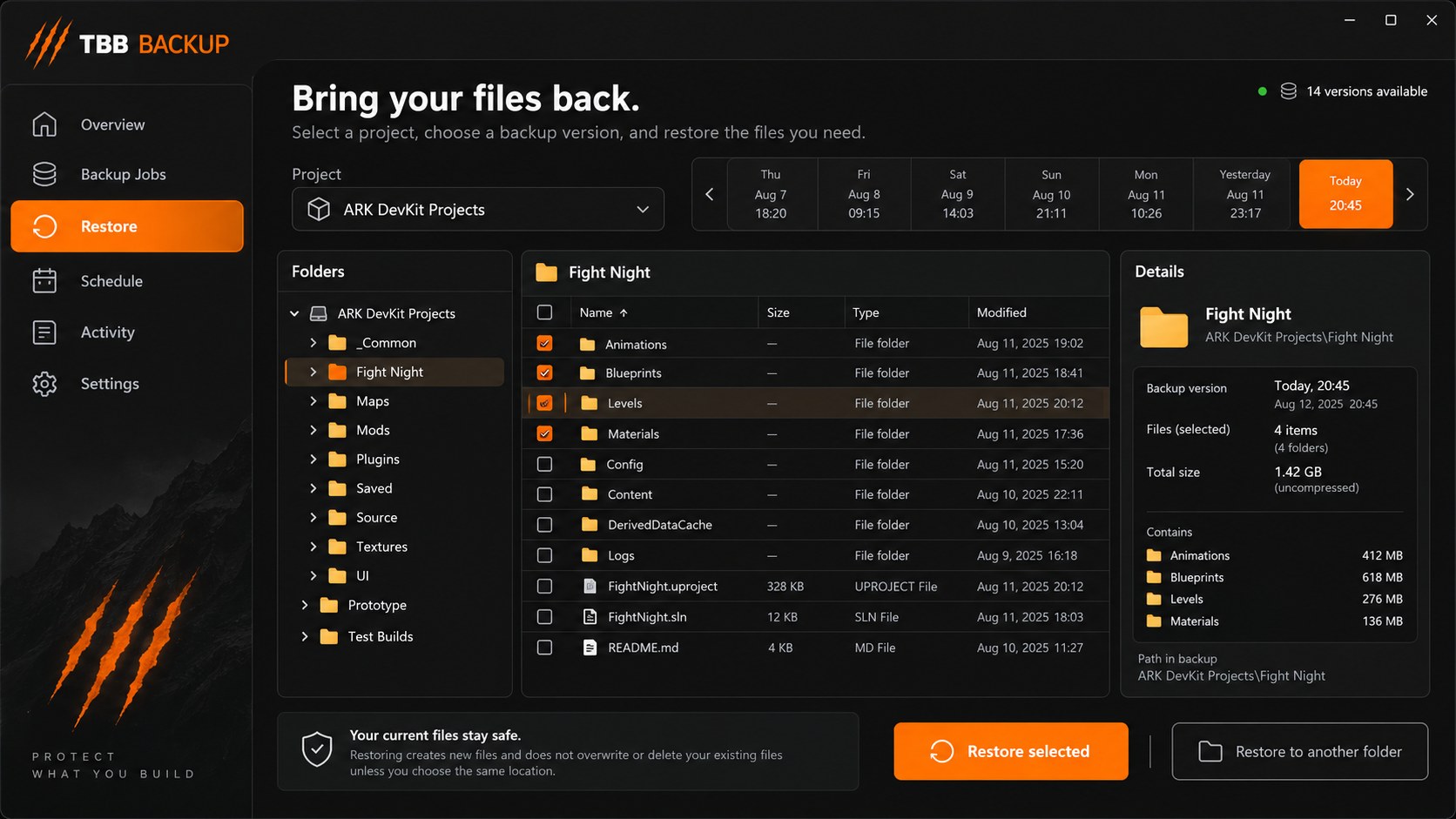
Approved TBB Backup design concept showing the restore browser.
Approved design concept · In development · Not an application screenshot
A closer look · Interface concepts

A home for your collection.

TBB ///Model collection
◇

See what you own

Cliffs & rocks
24 models
Structures
18 models
Interface illustration · Features and layout may change
TBB ///Asset details
◇

Find the right file

Format
FBX / Blender
Folder
My model collection
Interface illustration · Features and layout may change
TBB ///Folder workspace
◇

Make room for your next idea

Equipment / Gloves
Organised
Nature / Trees
Organised
Interface illustration · Features and layout may change
Made to help

Protect what you build.

I’m building TBB Backup to help protect mod projects, app source files, documents and the folders you choose. The design uses my orange-and-charcoal TBB branding, with a restore workspace for browsing folders, choosing an earlier version and recovering individual files. The first development alpha has a working backup engine and desktop interface. Named jobs, content-addressed storage, SHA-256 verification, version browsing, exclusions, milestone notes and pinned versions are implemented. Schedules run while the app is open. Restore creates a new recovery folder so existing working files are not overwritten. Nine automated backup-engine tests currently pass. Windows visual testing and standalone executable packaging are still pending. The image shown here is the approved design concept, not a screenshot of the finished app. There is no public Windows installer or release date yet. I’ll share more as the Windows build and recovery workflow pass testing.

Taking shape

  • Saved named backup jobs in the development alpha
  • SHA-256 verified backups with unchanged content stored once
  • Version browser with folder tree, search and selected-file restore
  • Recovery into a separate newly created folder
  • Milestone notes and pinned versions
  • Exclusions and retention of ordinary version indexes
  • Schedules and catch-up while the app is open
  • Saved local activity history

Local first. Yours to use.

The apps are designed around local features. Optional update checks are planned separately from the main workspace.

Online downloads and services still need an internet connection.

Release notes

Coming soon

The first release is on its way.

Downloads, a confirmed version and release notes will appear here when the app is ready.

Release history

Patch notes

All patch notes →

Release notes will appear here when published.

The plan · Subject to change

What’s on the drawing board

  • Windows testing, standalone executable and branded installer
  • Background scheduling
  • Storage dashboard and safe unused-data cleanup
  • Project presets and multiple source folders
  • Compression, encryption and update notifications

Compatibility

For local file backups to a separate folder or mounted drive. Close editors before backing up projects. Schedules require the app to remain open. Not a system-image or live database backup tool.

Known issues

  • Windows packaging and visual testing pending.
  • Schedules require the app to remain open.
  • Retention removes old version indexes but does not yet reclaim unused data.
  • Encryption and compression are not yet implemented.
Pricing notes

Availability and pricing will be confirmed before release.

Follow the journey

Development journal

Project journal →

Progress notes and screenshots will appear here as they are published.